Pinterest continues to be one of the best platforms for driving free traffic to blogs, online stores, digital products, and affiliate websites. Unlike many social media platforms where posts disappear within hours, Pinterest Pins can continue bringing visitors for months or even years. That is why bloggers, Etsy sellers, Shopify store owners, affiliate marketers, and content creators still invest time in Pinterest marketing.
However, creating fresh Pins consistently is not easy. You need new ideas, attractive designs, keyword-rich titles, engaging descriptions, and a regular posting schedule. Doing all of this manually can quickly become overwhelming. This is where AI hops in. AI cannot replace your creativity or knowledge, but it can handle many repetitive tasks that take up your time. AI helps you work faster while keeping your content fresh.
In this guide, you’ll learn practical ways to use AI throughout your Pinterest workflow so you can save time, improve your content, and create Pins that have a better chance of getting clicks in 2026.
1. Research Pinterest Trends with AI
Successful Pinterest marketing starts with understanding what people are searching for. Creating beautiful Pins is helpful, but creating Pins about topics people already want is even better. AI makes keyword research much easier. Instead of spending hours searching manually, you can ask AI to suggest trending topics, seasonal ideas, and evergreen content opportunities. Always verify AI suggestions using Pinterest Trends or Google Trends.
For example, if you run a recipe blog, you could ask: “Give me Pinterest-friendly fall dessert ideas that usually trend between September and November.” Within seconds, AI can generate dozens of ideas that you can research further.
2. Generate Endless Pinterest Content Ideas
Many creators stop posting consistently because they simply run out of ideas. Lukily AI is one of the best brainstorming partners you can have. Instead of staring at a blank screen, you can ask AI to generate dozens of content ideas within seconds. AI can help you create blog post ideas, product Pins, educational Pins, infographics, tutorials, checklists, inspirational quotes, before-and-after Pins, seasonal content, buying guides, and gift guides. One idea can often become multiple Pins.
Try prompts like:
- Give me 50 Pinterest content ideas for a travel blog.
- Create 20 Pinterest ideas for an Etsy candle shop.
- Suggest Pinterest topics that are evergreen in personal finance.
- Generate Pinterest ideas that target beginners learning photography.
3. Write Better Pinterest Titles and Descriptions
Pinterest is also a search engine. That means your titles and descriptions help Pinterest understand your content. AI can create several title options within seconds. A good title can generate more clicks and thus a larger digital footprint. Instead of writing one title, ask AI for ten and select what works well for you.
AI also helps write Descriptions. Instead of stuffing keywords, AI can create descriptions that sound natural while still helping Pinterest understand your content. Always edit AI generated text to match your brand voice. Adding your own experience makes the description more authentic.
4. Design Eye Catching Pinterest Pins with AI
Even the best content may not get clicks if the design does not attract attention. Pinterest is highly visual. Your Pin needs to stand out among hundreds of others. AI design tools make it much easier to create professional-looking Pins, even if you have little design experience. These tools can suggest attractive layouts, recommend matching color and fonts.
For example, you could enter a prompt like: “A bright home office with a laptop, coffee mug, notebook, and green plants, styled for Pinterest.” AI generated images work well for Blog graphics, Digital product mockups, Lifestyle concepts, Educational illustrations, Decorative backgrounds, or Pinterest cover images. Real photos are better for personal branding, food photography and product photography.
6. Create Multiple Pin Variations in Minutes
One of the biggest advantages of Pinterest is that fresh content often performs better than repeatedly posting the exact same Pin. Creating several versions of a Pin manually can take hours, but AI makes the process much faster. Instead of making one Pin for a blog post, you can create five or ten unique versions. Each version can have a different headline, color scheme, layout, or call to action while linking to the same content.
You can also ask AI to rewrite descriptions, suggest seasonal angles, or create beginner-focused and advanced versions. Pinterest rewards fresh content, and multiple high quality variations give you more opportunities to reach different audiences.
7. Schedule and Automate Pinterest Posting
Consistency is one of the keys to long-term Pinterest growth. Instead of designing and publishing Pins every day, AI helps you batch-create content and schedule it in advance. Automation is useful, but it should support your strategy, not replace it. Continue reviewing your analytics, updating older Pins, and creating new content based on what your audience is searching for. A simple workflow might look like this:
- Use AI to brainstorm ideas.
- Generate titles and descriptions.
- Design several Pins.
- Schedule them for the next two to four weeks.
This approach saves time and helps you maintain a regular posting schedule. Helpful Scheduling Tools are Tailwind, Pinterest Scheduler, and Buffer etc.
8. Analyze Pinterest Performance with AI
Creating Pins is only half the job. The other half is understanding which Pins perform best. AI can help you analyze your Pinterest data and identify patterns that might be difficult to notice on your own.
For example, AI can help answer questions like which topics generate the highest traffic? which colors seem to perform better? which keywords appear in your best-performing Pins? instead of simply looking at numbers, AI can summarize your analytics and suggest improvements.
Imagine that your travel Pins consistently outperform your packing checklist Pins. AI may recommend creating more destination guides or expanding into related travel topics. Review your analytics regularly and let the data guide your future content.
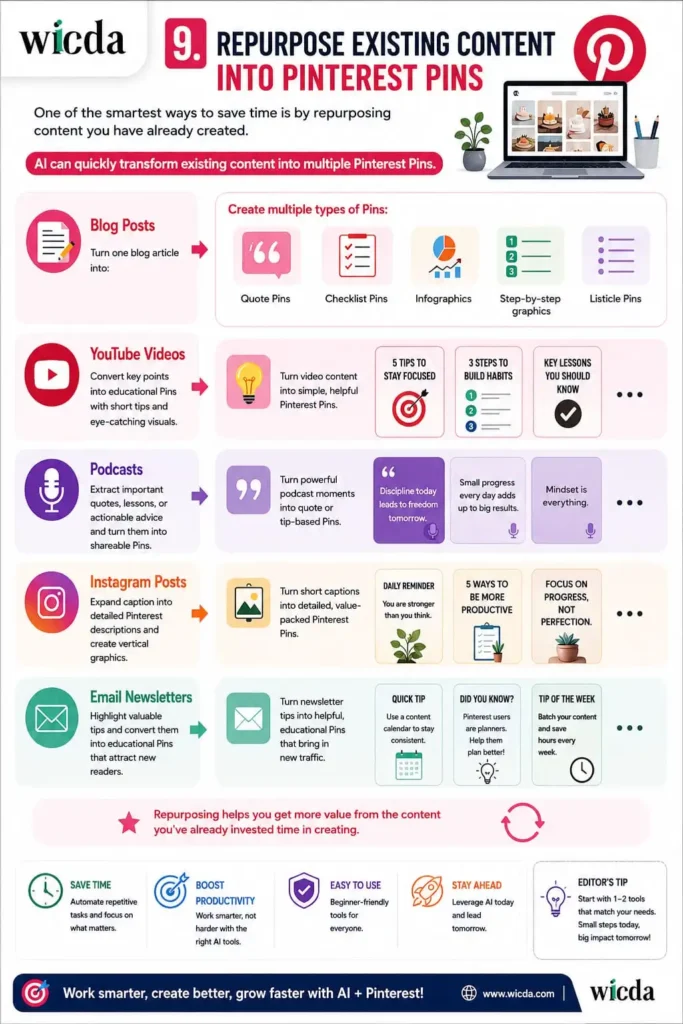
9. Repurpose Existing Content into Pinterest Pins
One of the smartest ways to save time is by repurposing content you have already created. AI can quickly transform existing content into multiple Pinterest Pins. Repurposing helps you get more value from the content you’ve already invested time in creating.
For example: Turn one blog article into: Quote Pins, Checklist Pins, Infographics, Step-by-step graphics, Listicle Pins, YouTube Videos. Extract important quotes, lessons, or actionable advice and turn them into shareable Pins. Turning Instagram Posts into detailed Pinterest descriptions and create vertical graphics. The main tips of Email Newsletters can be converted into educational pins.
Conclusion
Pinterest continues to be one of the most valuable platforms for driving long-term traffic, generating leads, and promoting products. As competition grows, working smarter becomes just as important as working harder.
AI gives creators a powerful way to save time, generate fresh ideas, improve designs, optimize content, and stay consistent without sacrificing quality. Remember, the most successful Pinterest strategy combines the speed of AI with your own creativity, expertise, and understanding of your audience. When you focus on creating genuinely helpful content and use AI as a supportive tool, you’ll be in a much stronger position to create Pinterest Pins that earn more clicks and drive sustainable growth throughout 2026 and beyond.
If this guide helped you discover something new, bookmark this article so you can revisit it later. And if you have a favorite AI for Pinterest that deserves more attention, share it in the comments and help others discover it too 🙂 Shoot an email to us @riensweden@gmail.com if you want us to publish your article related to AI and dedicate the recognition back to you. Thank you.
Can AI create Pinterest Pins?
Yes. AI can help generate ideas, write titles and descriptions, design graphics, and even create images. However, reviewing and customizing the final result is always recommended.
Which AI tool is best for Pinterest?
There isn’t one perfect tool. Many creators combine ChatGPT for writing, Canva AI for design, and Tailwind for scheduling to build an efficient workflow.
Does Pinterest allow AI generated images?
Pinterest generally allows AI generated content, but it should follow Pinterest’s Community Guidelines. Ensure your images are accurate, original, and not misleading.
Can AI improve Pinterest SEO?
Yes. AI can suggest keywords, optimize titles, write better descriptions, and help you organize your content around search intent.
Is Canva AI good for Pinterest?
Yes. Canva AI provides templates, background removal, image editing, resizing, and design suggestions that are especially useful for Pinterest creators
How often should I post on Pinterest?
Quality is more important than quantity. A consistent schedule whether daily or several times a week is generally more effective than posting irregularly.
Should beginners use AI for Pinterest?
Absolutely. AI can simplify brainstorming, writing, and design, making Pinterest much less intimidating for new creators.
Will AI replace Pinterest creators?
No. AI is a productivity tool. Original ideas, personal experience, and authentic content remain the biggest factors in building trust and growing an audience.